
Built for Property Operations
Bookings, tasks, routines, maintenance tickets, and staff availability – live progress and instant mobile sync.

Manage Smarter
Plan, reschedule & control property operations in real time - across units and staff.
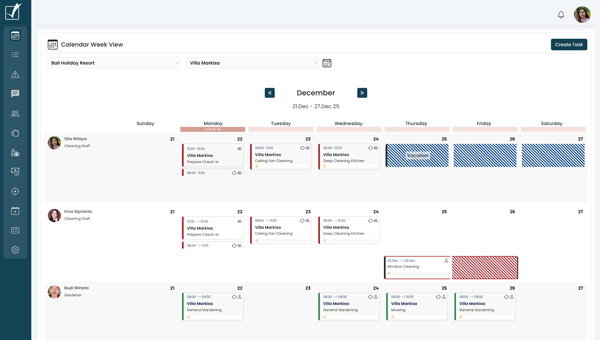
Monthly, weekly, and daily views that combine bookings, SOP routines, maintenance tickets, and staff availability – with live progress and instant mobile sync.


Contact Us
Every message is a step toward better service. We’re here and ready to respond.
Luingo Calendar vs. generic tools (Asana / Trello / Monday)
Generic tools are great for project boards – but property ops need live execution
Approval + improvement loop for quality control
Instant mobile sync + optional push notifications
Live progress via checklist + photo-proof
Bookings/reservations context
Staff-only visibility rules
Units/team views
Vacation & Sick Leave
Reservations/bookings (iCal)
Tasks (single or multi-day)
Routines (recurring SOP schedules)
Maintenance tickets (defect reports)
Drag-and-drop reassignment
Team View
Planning & conflict prevention
Tasks are sorted by employee & unit so you instantly see who is overloaded, who is free, and what needs attention today.
Reservations are only half the job. Luingo runs the work on-site.
Luingo OS is built for real day-to-day operations on site. See who is doing what, when and where – and confirm it’s actually done with checklists, optional photo proof, and real-time progress. Your calendar becomes a live control center that connects bookings to tasks, routines, maintenance tickets, approvals, and vendor coordination, with instant mobile updates for the whole team.
All-in-One Operations Calendar
See bookings, single tasks, routines, maintenance tickets, improvements, and leave in one operational view. Plan faster and prevent conflicts before they happen.
Drag & Drop Rescheduling
Move tasks and routines to different days or assign them to another employee with drag and drop. Changes are reflected instantly across the system.
Bookings & Reservations
Booked days and check-in/check-out moments are clearly visible so you can schedule work around guest stays or facility reservations.
Checklists + Photo Proof
Location-Based Staff Check-In.
Monitor attendance with GPS precision - no punch cards, no guesswork, just reliable tracking.
Single Tasks & Multi-Day Tasks
Add one-off tasks or tasks spanning multiple days and keep everything organized in context. Great for projects, deep cleans, or longer repairs.
Routines (Recurring SOPs)
Run recurring schedules for cleaning, inspections, pool, gardening, and more. Routines appear directly in the calendar so nothing is forgotten.
Instant Mobile Sync
Calendar changes update immediately on staff phones, so the team always follows the latest schedule. Optional push notifications can alert staff to changes.
Maintenance Tickets
Maintenance requests and defect reports appear in the same calendar view as operational work. Track workload and resolve issues without jumping between tools.
Improvement Follow-Ups
Create improvement tasks when something needs extra attention after a job is completed. Keep follow-ups visible until quality is fully satisfied.
Live progress Tracking
Not just a calendar box
See all important information at a glance. Open detailed task or routine information instantly, edit it in seconds, and keep updates synced in real time across all involved team members – with optional push notifications.

Task category indicator
One person or team task?
Task progress in real time
Single task or routine
Field of work
Main location or Sub Unit