SOPs · Tasks · Quality control
Your standards.
In action. On site. Every day.
From the first instruction to the supervisor’s inspection, Luingo connects the work your team does every day. Write SOPs in your language. Let your team work in theirs. Follow on-site execution with photos taken directly through the Luingo app.
ONE CONNECTED WAY OF WORKING
01 / DEFINE
SOPs
The standard and the steps.
02 / ORGANIZE
Tasks & routines
The right work, property and person.
03 / DO
On-site execution
On-site work. In-app photo proof.
04 / REVIEW
Inspection & follow-up
Accountability through to resolution.
01 / START WITH SOPs
Your company standards. Consistent quality across your portfolio.
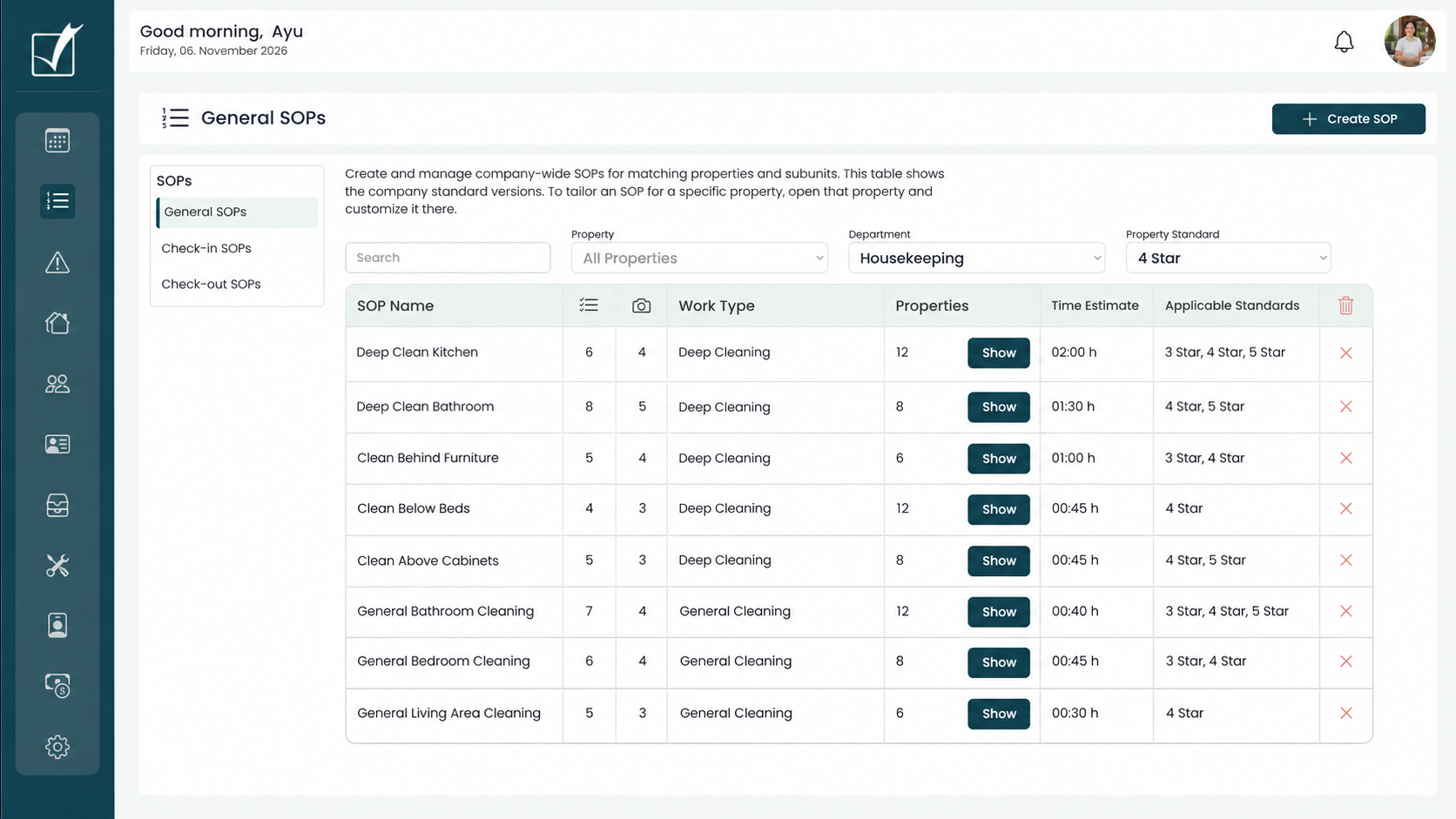
Use Luingo to create company-wide SOPs and apply them across your portfolio based on each property’s standards. Customize them at property level to reflect local needs, while keeping work consistent, quality reliable and instructions easy for every team to follow.
COMPANY → PROPERTY
A shared standard. A local fit.
Apply standards across your property company, choose the standards relevant to selected properties, and adapt instructions to an individual property.
INSTRUCTIONS → ACTION
Everything needed to do the job.
Keep steps, checklists, reference photos, files and links with the task. The next person arriving at the property has the same instructions and supporting material in their hand.
OFFICE → FIELD
Your SOP. Their language.
Write the SOP in English and have it translated into your chosen secondary language. Staff read the instructions and respond in their own language, right inside the task.
BUILT FOR MULTILINGUAL TEAMS
Luingo speaks your employees’ language.
Luingo is available in seven languages. Choose two for your operation, with more languages available to add. Your standards and your team’s responses can move between languages without leaving the workflow.
1 / WRITE IN YOUR LANGUAGE
One SOP, understood by your team.
As a manager, write your SOP in English. Luingo translates it into your chosen secondary language, so your team on site can read the instructions in Indonesian, for example.
2 / RESPOND IN THEIR LANGUAGE
Let staff speak naturally.
Staff respond in their own language using text, voice recordings or voice-to-text. They can explain the work and report what they find in the way that is easiest for them.
3 / REVIEW IN YOUR LANGUAGE
Understand the outcome.
Read staff responses in your selected management language. With English and Indonesian selected, staff work in Indonesian and you review in English. French can be selected or added for managers who review in French.
02 / CREATE THE WORK
One task. A repeating routine. A stay that starts the work.
Use the same operational standards for one-off jobs and recurring work, with the context of the property attached.
ONE-OFF
Create a single task
Assign a specific job when it is needed, with instructions, attachments and a responsible person.
RECURRING
Build a routine
Create the routine and its instructions once. It generates the recurring tasks, keeping your standards in place even when the person doing the work changes.
STAY-RELATED
Connect check-in and check-out
Connect preparation and turnover work to check-in and check-out routines, keeping the work tied to the property and the stay.
SET THE SCOPE
Company-wide consistency, property-level detail.
Choose which standards apply, where the work happens and who takes responsibility. A shared routine can still reflect the details that make each property different.
YOUR OPERATION AT A GLANCE
See the work.
Coordinate your team.
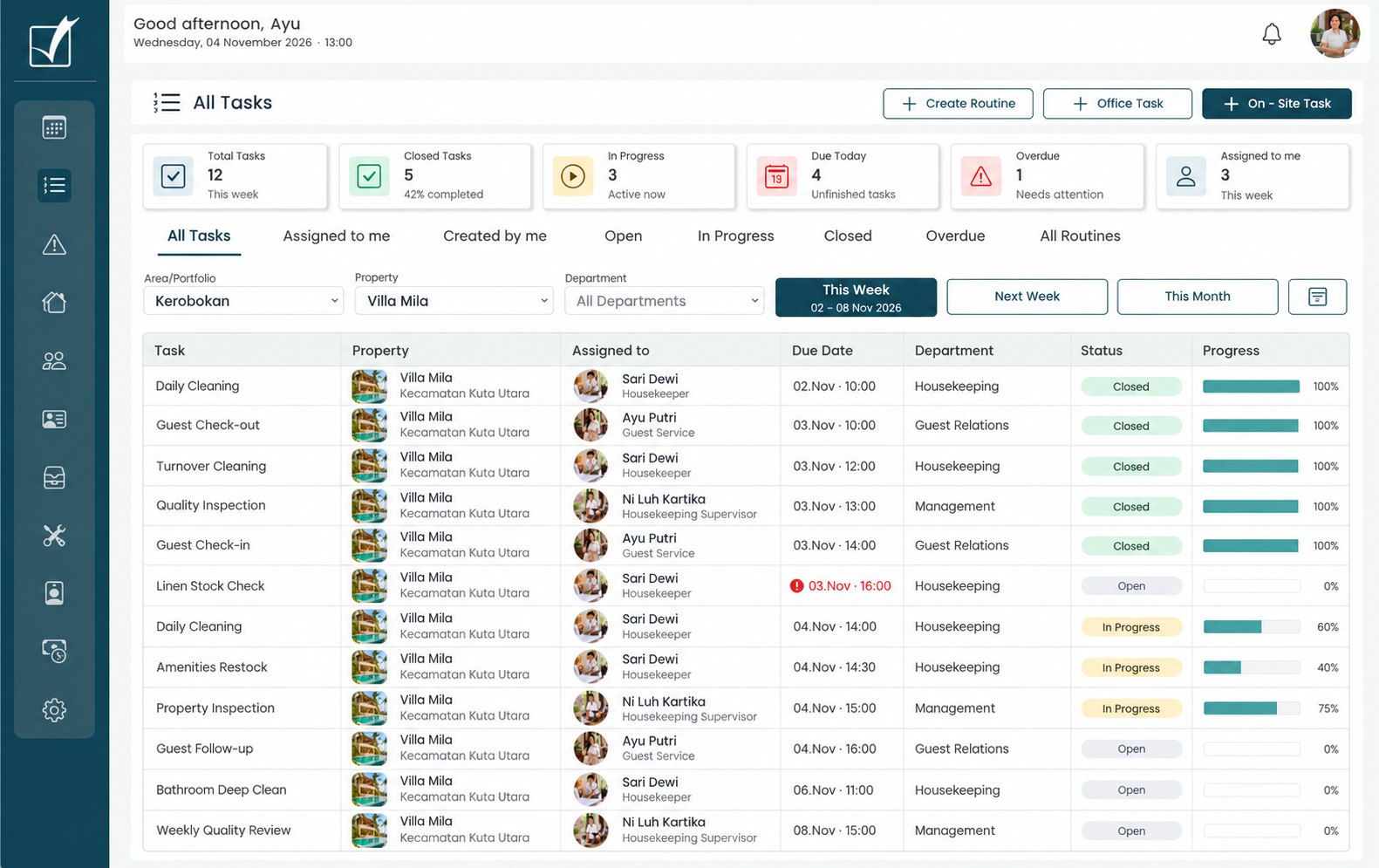
Bring tasks, responsibilities and progress into one overview. See what needs attention and coordinate the next steps across your properties.
Focus on the right work
Filter by portfolio, property and department. Review this week, next week or the month ahead.
Keep responsibility clear
See who is assigned to each task, where it happens and when it is due.
Know where to follow up
Track open, in-progress and closed tasks. Spot overdue work and check progress before following up with your team.
READY FOR THE NEXT PERSON
Staff change. Your standards stay in place.
Sickness, holiday leave, a new employee or a daily worker covering a shift: the property’s tasks and instructions are already in place. The person stepping in has the guidance they need in the palm of their hand.
SET UP ONCE
Keep the knowledge with the property.
Prepare the routine, task instructions and supporting files once. They stay with the work, ready for the next team member who takes it on.
HAND OVER WITH CONFIDENCE
Make the first shift easier.
A replacement or daily worker arriving at an unfamiliar property can open the assigned tasks and find the steps, checklists, reference photos, files and links together.
FOLLOW THE SAME STANDARD
A different person. Clear instructions.
The incoming team member follows the property’s SOP in their language and records the work through Luingo. Supervisors review against the same standard, whoever carries out the task.
03 / THE DAILY MOBILE WORKFLOW
The task is where the work happens.
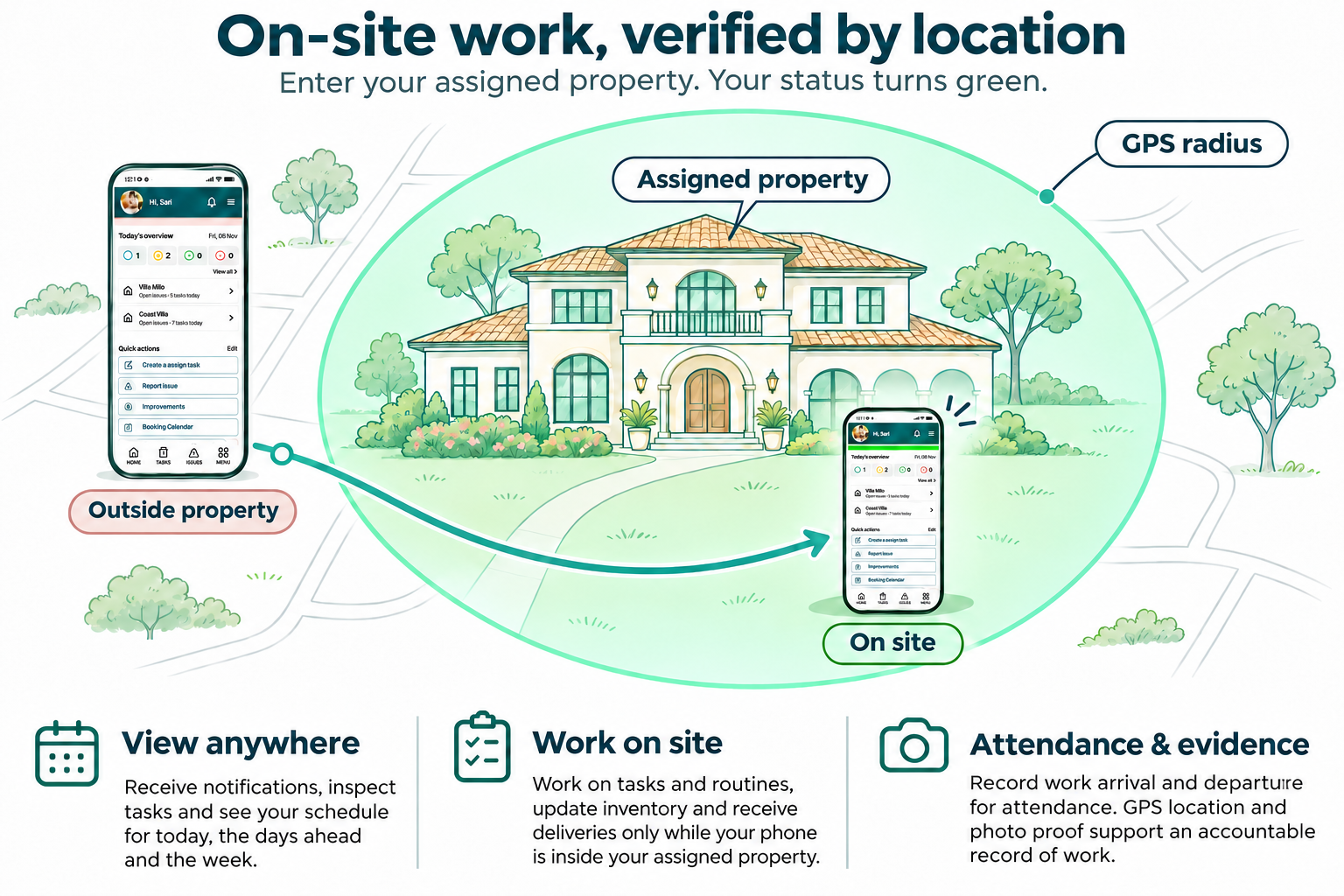
A task can be viewed remotely. Acting on it and following up through the task workflow requires the team member to be on site with their phone. Task photo proof is captured only through the Luingo app.
ON SITE · THROUGH THE LUINGO APP
On-site work.
In-app photos.
Real accountability.
The team member works on the task at the property using their phone. Photos for task proof must be taken directly through the Luingo app; existing photos from the phone’s gallery cannot be used as task photo proof.
A message saying “done” does not complete the task workflow. The work, checks and in-app photo proof are recorded against the task and the person responsible, ready for supervisor review.
1 / OPEN THE TASK
Understand the job
View the property, assigned work and SOP in your language. Open the links, files and reference photos that explain the expected result.
2 / FOLLOW THE STANDARD
Work on the task on site
Be at the property with your phone to act on the task. Follow the checklist and visual guidance in Luingo while carrying out the job.
3 / RECORD THE RESULT
Take the proof through Luingo
Take task photos directly through the Luingo app. Add your response in your own language with text, a voice recording or voice-to-text, keeping the explanation with the work.
04 / INSPECT & FOLLOW UP
Completion starts the quality review.
The supervisor connects the standard to the actual result: review the work, inspect the property and follow through on anything that needs attention.
REVIEW
See the work in context
Review the SOP, checklist results and photos taken through Luingo. Read the team’s responses in your selected language, with the work connected to the person responsible.
INSPECT
Check the result on site
Use a supervisor inspection to assess the quality of the work against your standards and identify what needs attention.
FOLLOW UP
Give the next action an owner
Turn findings into clear follow-up work. Keep responsibility visible until the corrective work has been reviewed.
THE IMPROVEMENT LOOP
Better inspections. Better standards. Better service.
Use recurring inspection findings to improve instructions, reference photos and routines. What the supervisor learns on site helps the next person do the job better.
SOP → Task → On-site work → Inspection → Follow-up → Improved SOP
ONE EXAMPLE, FROM START TO FINISH
A deep clean behind the bedside cabinet.
Follow one real job across desktop setup, mobile execution and supervisor inspection.
STANDARD
Define the expected result
Explain how to prepare the area, safely move the cabinet where appropriate, clean the floor and skirting, and return everything to position.
EXECUTION
Show the same area before and after
The team member follows the SOP in their language and takes before-and-after photos through the Luingo app, on site. Their text or voice response adds context for the supervisor.
IMPROVEMENT
Inspect, follow up and refine
The supervisor checks the result. Anything missed becomes follow-up work; repeated findings help refine the SOP.
SEE YOUR OPERATION IN LUINGO
Bring one SOP. Walk through the whole workflow.
See how your standards connect to routine setup, on-site tasks, real photos and supervisor follow-up.