ATTENDANCE & HR
Connect staff attendance with the work on site.
Give managers a clearer view of attendance and employee records while keeping access aligned with operational responsibilities.
TEAM LOCATION & DAILY JOURNEYS
One team. Several properties. A clearer picture of the day.
See who is on site, follow their visits and understand the time spent travelling. Explore the overview, then step into two employees’ daily journeys.
01 / Team map
See where the working day is happening.
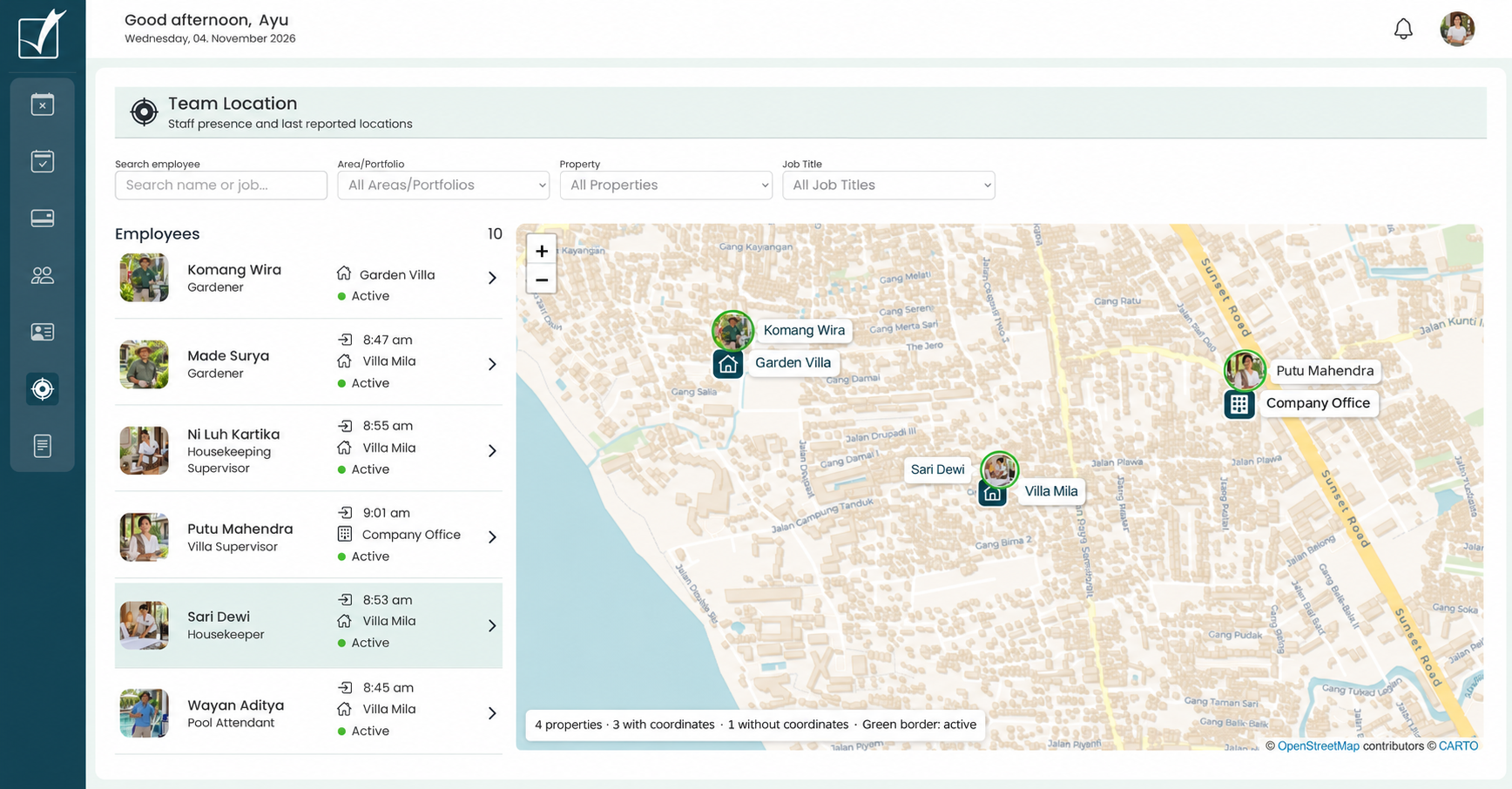
Start with the team map. See employees alongside their reported work locations, with check-in times and presence status in one view.
- Find a person by name, property, area or job title.
- Read the check-in time and property beside each employee.
- Open an employee to follow their visits and travel for the day.
A location report gives you attendance context. It does not tell you whether a task has been completed.
 View full size
02 / Housekeeping journey
Follow a visit to the office, and back.
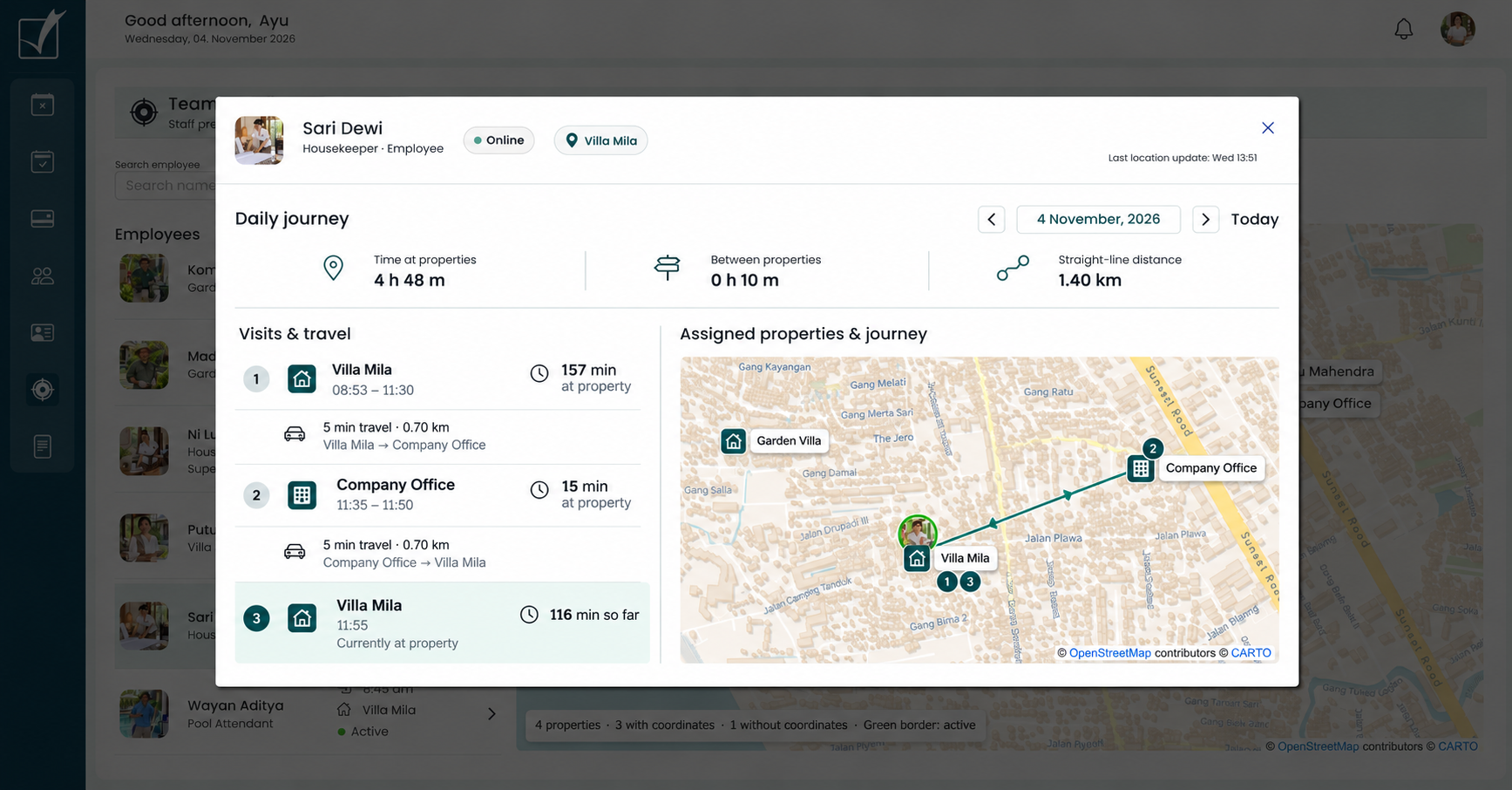
Sari Dewi starts at Villa Mila at 08:53. Her daily journey separates time at the villa from a short office visit and the travel between them.
- 08:53–11:30 · At Villa Mila for 157 minutes.
- 11:35–11:50 · At the office for 15 minutes, with five minutes of travel each way.
- 11:55 onward · Back at Villa Mila, with the current visit still open.
At the example’s 13:51 update, Sari has spent 4 h 48 m at properties and 10 minutes travelling.
 View full size
03 / Gardener journey
Separate time on site from time on the road.
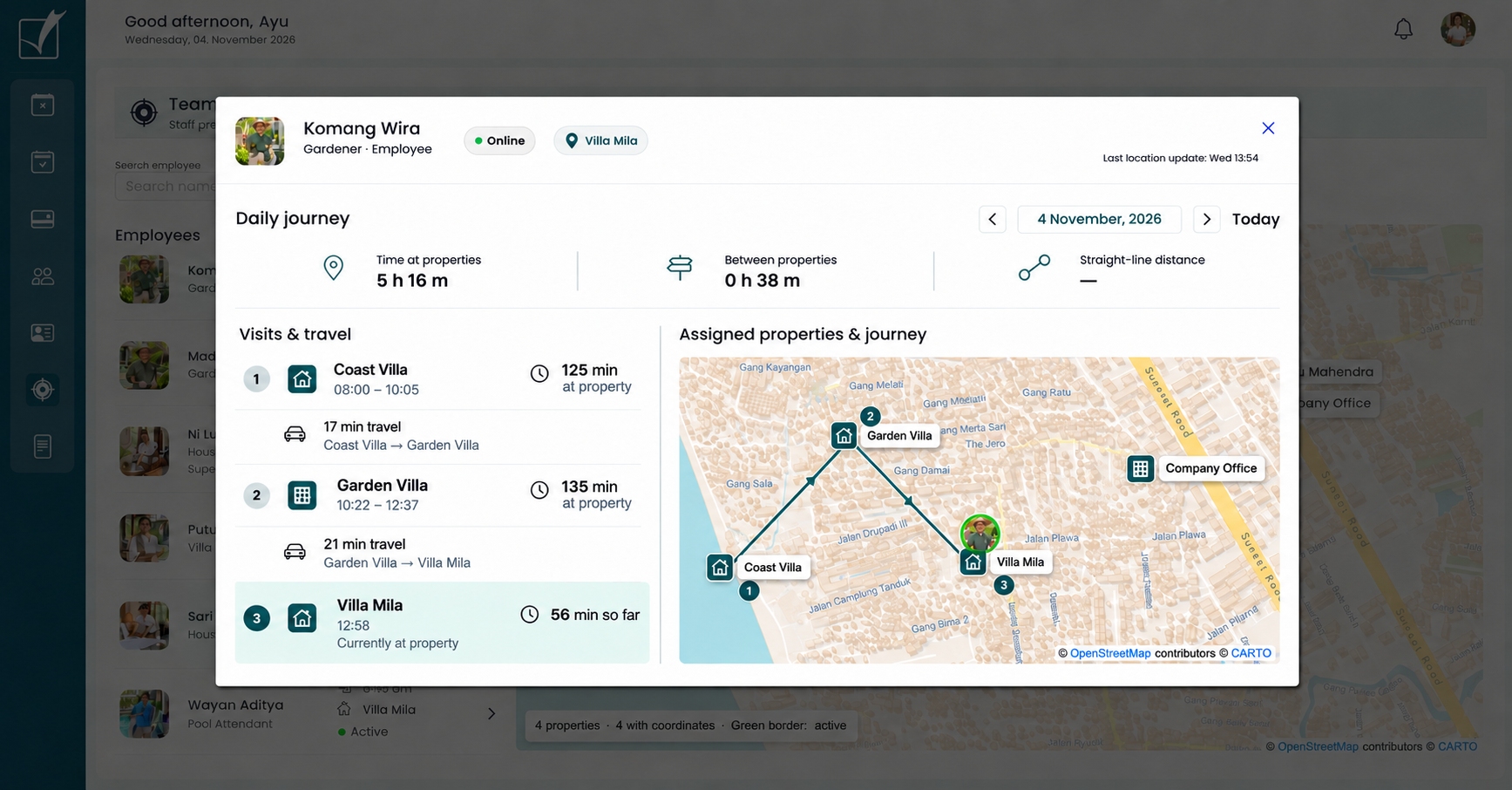
Komang Wira works across three villas. His journey makes each stop visible, so the time spent moving between properties is easy to understand.
- 08:00–10:05 · Coast Villa: 2 h 05 m on site, then 17 minutes travelling.
- 10:22–12:37 · Garden Villa: 2 h 15 m on site, then 21 minutes travelling.
- 12:58 onward · At Villa Mila, online with an ongoing visit.
At the example’s 13:54 update, that is 5 h 16 m at properties and 38 minutes between properties. Distance is not supplied in this example.
 View full size
Illustrative product views with sample journeys. Map lines connect locations; they do not show the exact road travelled.
Location gives attendance context.
Use location-based sign-in to connect attendance with the property where work takes place. Review the record alongside the operational responsibilities for that site.

Sign in at the work location
Record attendance in the context of on-site work.

Review the attendance record
Give managers a clear starting point for follow-up.

Keep access appropriate
Align employee information with operational responsibilities.
CONNECTED PAYROLL
From attendance to payslip. One powerful system.
Powerful payroll. Seamlessly connected. Luingo brings attendance, automated service-charge allocation, owner reporting and customizable payslips into one flow. Less admin for your team. More control over every payroll.
- Attendance into payrollConnect tracked attendance with employee payroll records.
- Automated service-charge allocationAllocate service charges automatically and carry approved payroll values into the owner report.
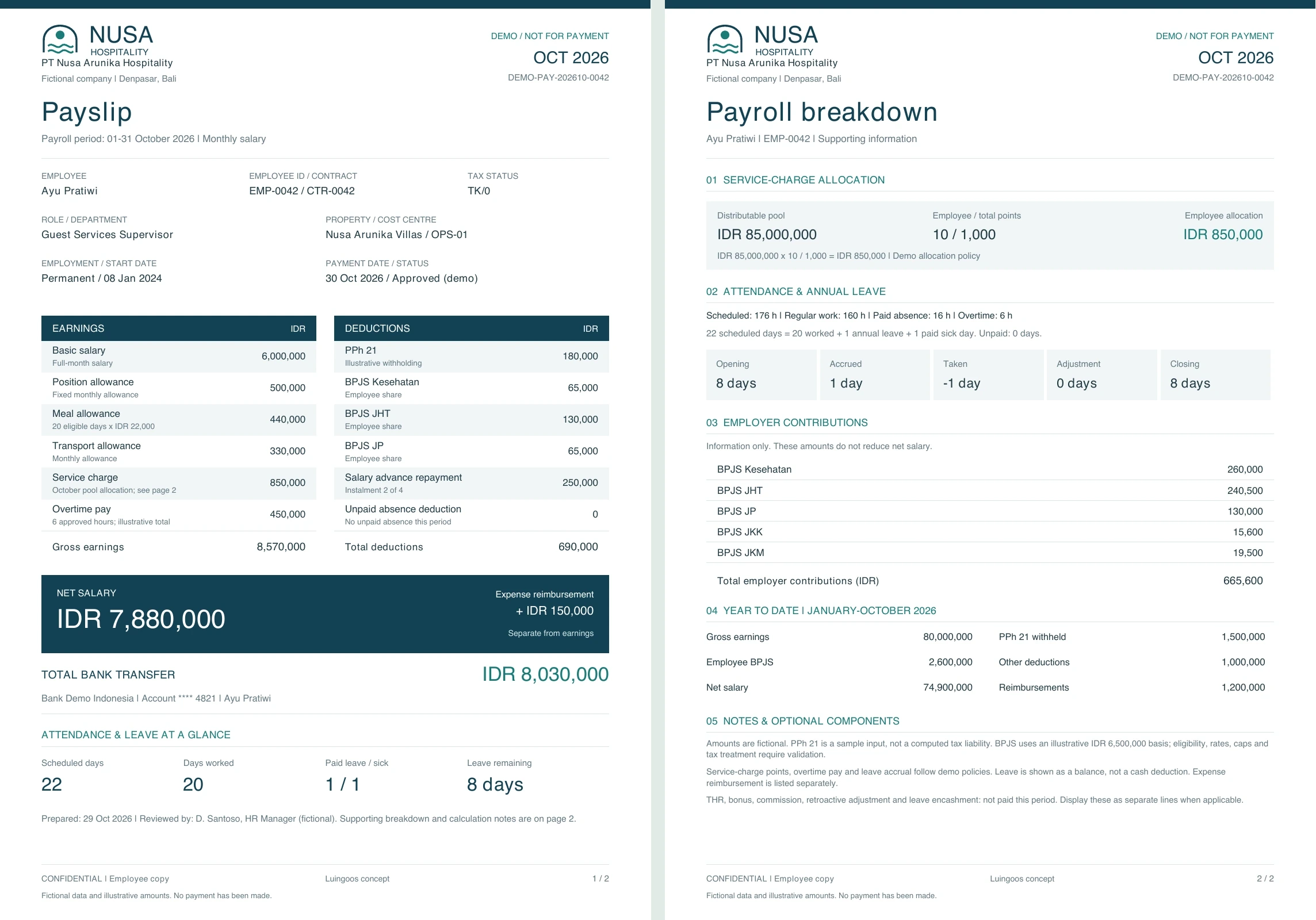
- Your payslips, ready to shareMake every payslip / slip gaji unmistakably yours. Customize the colors, add your logo and bring your brand identity to every employee’s payslip. Store it in Luingo and automate delivery to your team.
 Enlarge both pages
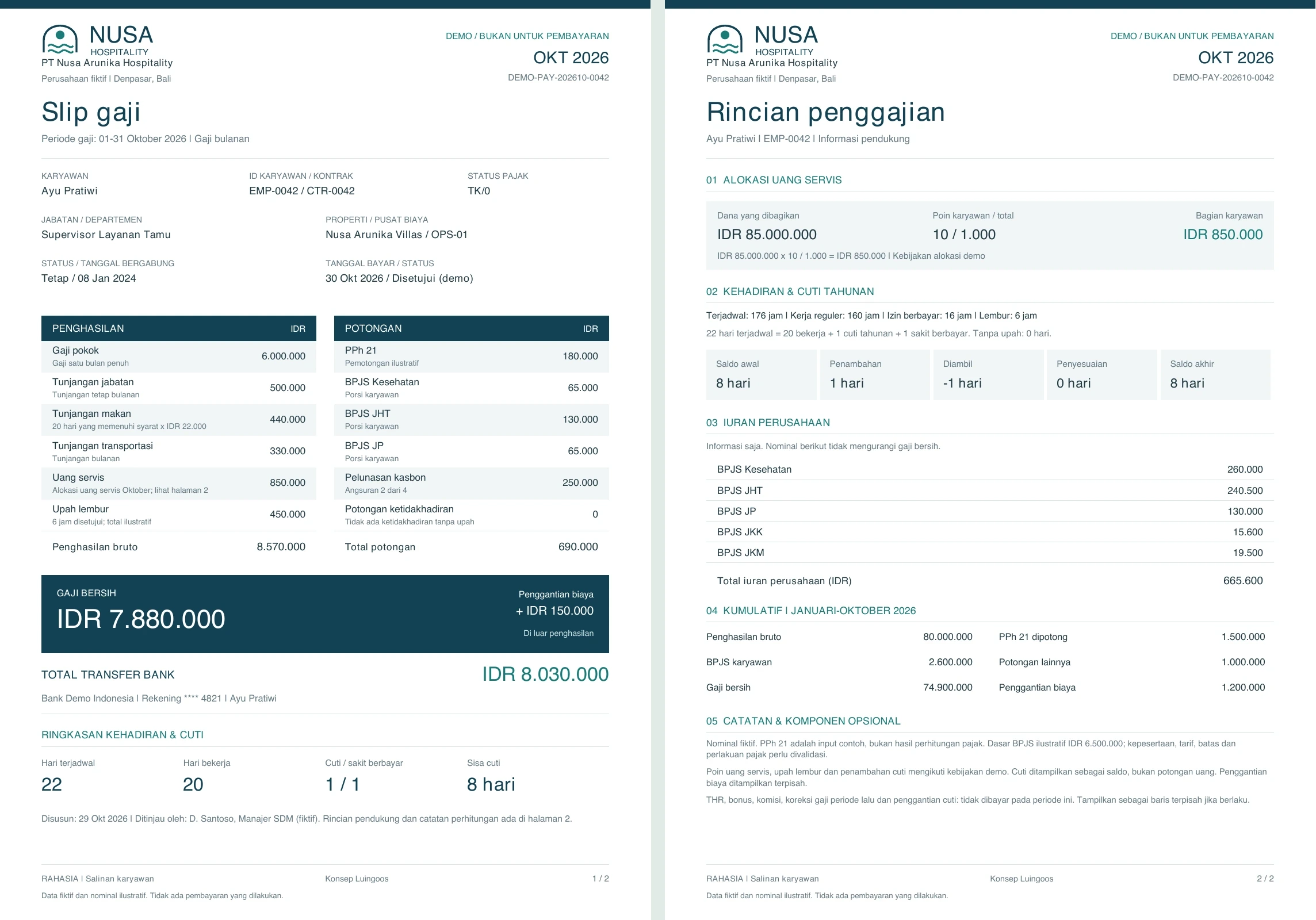 Enlarge both pages
Sample payslips · Fictional employee and illustrative amounts.
SET UP YOUR WAY. CONNECTED EVERY DAY.
One setup. Less admin. A clearer path from attendance to payroll.
Luingo turns daily attendance into useful HR data and connects it with the working arrangements you define. Build packages for your team, automate allocations and keep the records together, from the first check-in to the approved owner report.
Capture the working day
Record attendance through Luingo with location-based sign-in, time at each property and journeys between visits. Give HR a shared record of where and when the team worked, without rebuilding the picture from separate messages.
Fit the setup to each employee
Define monthly or hourly pay, fixed or flexible schedules and individual contract terms. Connect absence records and relevant holiday calendars so HR can review attendance alongside each person’s working arrangements.
Create packages once. Reuse them.
Combine benefits, allowances, employee and employer contributions, and work rewards into reusable packages. Link them to contract templates and tailor each employee’s setup, with less repeated work for every new hire.
Put service-charge allocation to work
Set up the allocation rules for your operation. Luingo automatically allocates service charges and creates the related records, keeping the amounts connected to employee data and ready for review.
Turn approved values into visibility
Carry approved payroll values into the owner report automatically. Keep HR and owner reporting connected, reduce repeated entry and give managers a clearer view of the staffing costs behind their operations.
Finish with your brand
Create a payslip / slip gaji in your colors, with your logo and brand identity. Keep it stored in Luingo and automate delivery to employees, bringing the same professional finish to every pay period.
Your people. Your rules.
One connected workflow.
You define the packages, working arrangements and allocation rules. Luingo connects the attendance data, automates the allocations and records, and carries approved values forward. Less reconciliation, more consistent records and more time for your team.
A few practical questions.
What does Luingo connect across HR and daily operations?
Luingo brings employee records, attendance, absence management, contract templates and payroll settings into the same operational system. Managers can connect the people assigned to a property with their working arrangements and attendance, reducing the need to reconcile separate staff lists and spreadsheets.
How does location-based attendance help a property manager?
Attendance sign-in records the work-location context. The team overview brings employee names, check-in times, presence status and reported property locations together, helping managers see where the working day is happening across their portfolio.
Can I follow an employee who works across several properties?
Yes. An employee’s daily journey shows visits in sequence, with time at each property and travel between visits. This is useful for gardeners, pool staff, guest relations and supervisors who move between locations. The map and timeline make those movements easier to understand together.
Does being at a property mean the work is complete?
Attendance and task completion answer different questions. Attendance shows presence at a work location; tasks record the work, checklist progress, supporting photos and review. Looking at both gives managers a clearer picture than a check-in or a completed-task label alone.
How does absence management help with staffing?
Staff availability and absences connect with task reassignment. When someone is unavailable, managers can review the affected work and arrange cover, keeping property responsibilities visible instead of leaving the change in a separate leave record or chat message.
Can we use public, religious and company holiday calendars?
Yes. Calendar layers let you organize national public holidays alongside additional religious or company dates. Review dates in their own categories and select the relevant calendars for your company’s working arrangements. This keeps different holiday policies visible without treating every employee’s calendar as identical.
Can I reuse contract templates for different roles?
Yes. Create templates for roles such as office staff, travelling gardeners or guest relations. Combine working arrangements, contract terms and the appropriate packages, then use the template as the starting point for an employee agreement with that person’s salary and dates. Standard terms are easier to manage when they do not have to be rebuilt for every hire.
Can employees have monthly or hourly pay and different schedules?
Yes. Monthly or hourly payment basis is separate from the working schedule. Contract templates support fixed working hours, flexible hours and flexible workdays, so the setup can reflect different roles. Fixed schedules show a weekly-hours total, with break settings taken into account.
Can we create benefits and allowance packages?
Yes. Benefits and allowances can be defined as reusable components and combined into packages. For example, a travelling role may need petrol or telephone allowances, while an office role uses a different package. Linking the appropriate package to a contract template keeps the offer and employee setup consistent.
What is the difference between a package and a contract template?
A package groups compensation components such as allowances, contributions and work rewards. A contract template combines the relevant packages with the payment basis, working arrangements and contract terms. This lets you reuse the same package across several roles while keeping their employment terms distinct.
Can employee and employer contributions be kept separate?
Yes. Contribution settings distinguish the employee’s share from the employer’s share. That distinction matters when reviewing what affects an employee’s pay and what adds to the company’s employment cost. Contributions can be included in reusable packages alongside the other compensation components.
Can work rewards be linked to calendar rules?
Yes. Work-reward settings support calendar-based rules that can be included in packages. This gives you a place to define how relevant days relate to additional compensation under your company’s arrangements, rather than leaving the rule as a note to remember each month.
What does payroll connect with in Luingo?
Payroll connects with employee records, attendance and the compensation setup: salary or hourly basis, contract terms, benefit packages, contributions and work rewards. The practical benefit is a shared basis for HR and payroll, with the employee’s working arrangements and operational attendance available in the same system.
Can Luingo replace our existing payroll system?
Luingo brings payroll settings, employee agreements and operational attendance together. A replacement decision should compare your exact requirements: pay rules, deductions, payslips, statutory reporting, payment exports and accounting connections. Coverage of those requirements varies by country and company; a connected HR workflow alone is not a promise of every function offered by a specialist payroll provider.
What is the benefit for a team managing several villas?
You can follow who is working, where they are working, the visits they make and the arrangements attached to their role. Reusable templates and packages make staff setup more consistent, while attendance and task records help managers follow the day’s work across properties. The result is less repeated setup and clearer context for staffing and payroll review.
Let’s walk through your operation together.
Show us how your team handles tasks, issues and owner updates. We’ll demonstrate the relevant Luingo workflows and discuss a practical starting point for your properties.
60 days · up to 20 properties · free onboarding. Contact details and Stripe card authorization are required. Charging follows the trial under your agreed plan.